Scientific imaging
Brain Imaging Data Structure (BIDS): a practical guide
How BIDS organises neuroimaging data, how to convert and validate a dataset, and the tools that read it.
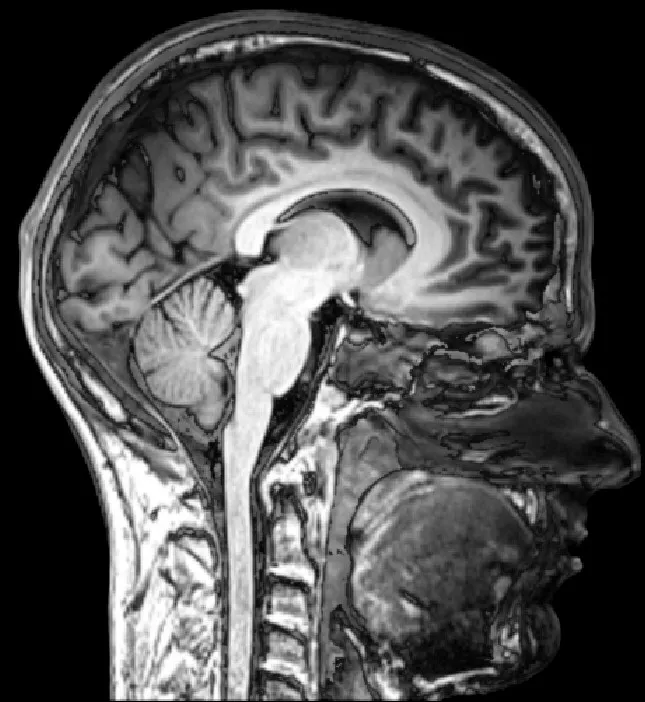
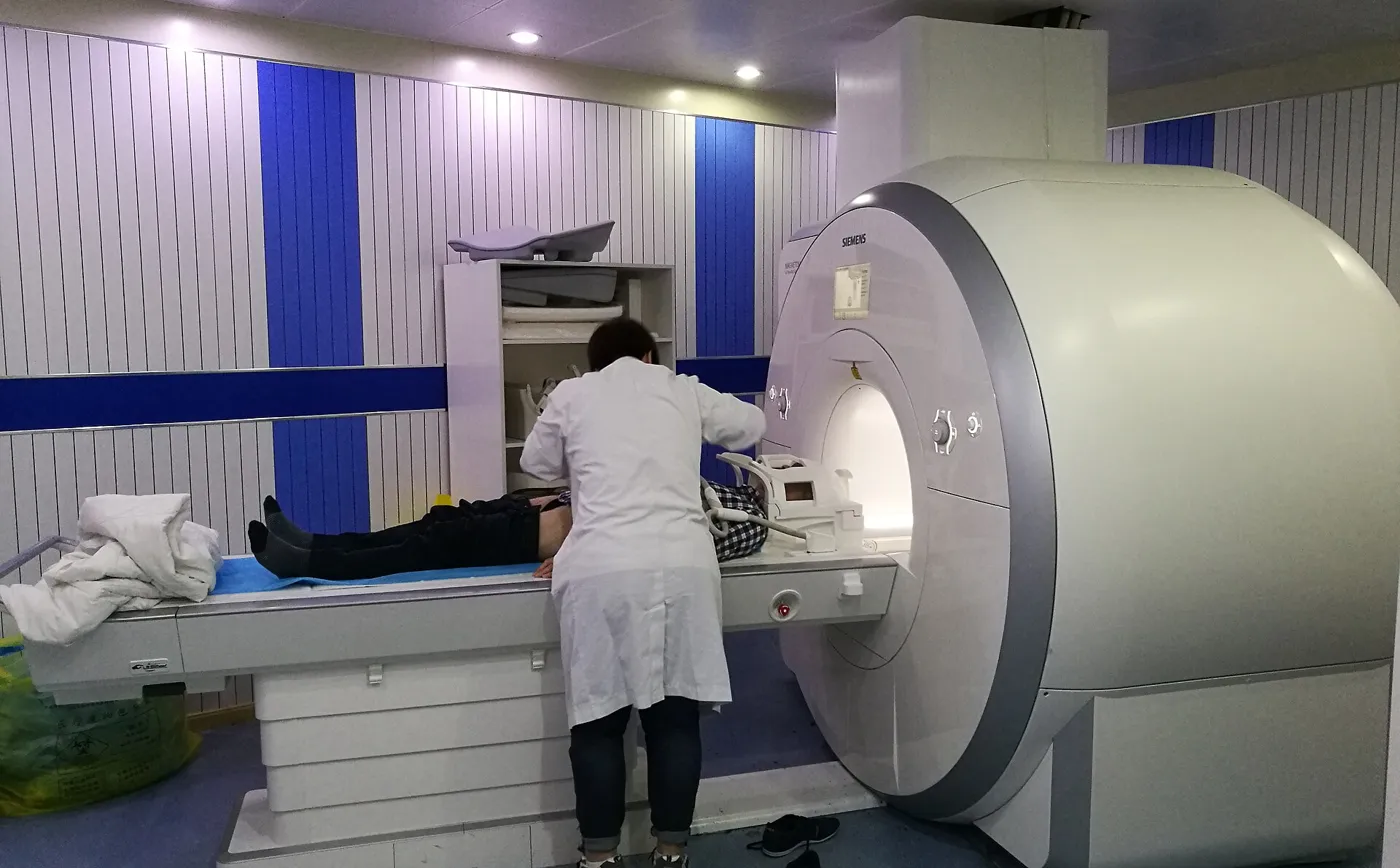
Photo: everyone's idle, Wikimedia Commons, CC BY-SA 2.0.

The Brain Imaging Data Structure, usually shortened to BIDS, is a community standard for organising and describing neuroimaging data. It says where each file goes and how to name it. Details about each scan go in small text files next to the images.
People and software can read a BIDS dataset without a separate guide to its folders.
- Started
- January 2015, Stanford working group
- First paper
- 2016, Scientific Data
- Current version
- 1.11.2
- Licence
- CC BY 4.0
- File types
- NIfTI, JSON, TSV
- Official site
- bids.neuroimaging.io

What BIDS is for
Before BIDS, every lab organised its scans differently. One group named a file sub01_rest.nii, another S1-RS-run1.nii.gz, and each kept the scan settings in a spreadsheet or lab notebook. Sharing data meant writing a guide to the folders. Every analysis script had to be rewritten for each new dataset.
BIDS replaces those private conventions with one public one. The standard was set out in a 2016 paper in Scientific Data by Gorgolewski and colleagues. It has grown since through community proposals. It began with MRI. It now covers many other kinds of data too, including EEG, MEG, intracranial EEG, PET, near-infrared spectroscopy, microscopy and motion capture.
The payoff is practical:
- A new team member can find any scan without asking.
- Analysis pipelines can read the dataset automatically, because they know where to look.
- Sharing a dataset on a public archive needs far less extra documentation.
- A validator can check the layout and catch missing information before analysis starts.
BIDS organises data. It does not process images, judge whether a scan is good or replace the ethics, consent and data-management requirements of a study.
The folder layout
A BIDS dataset is a folder with a fixed shape. A small MRI study with 2 participants looks like this:
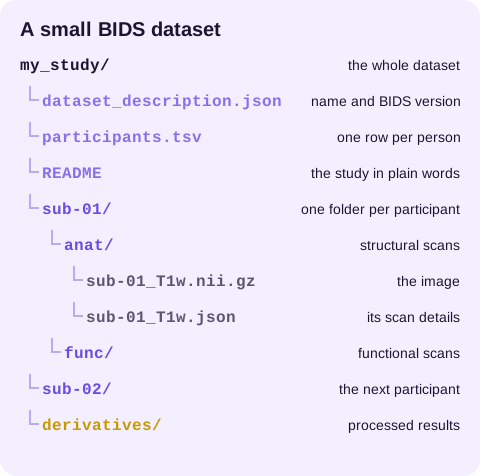
The top level holds files that describe the whole dataset. Each participant gets a folder that starts with sub- followed by a label.
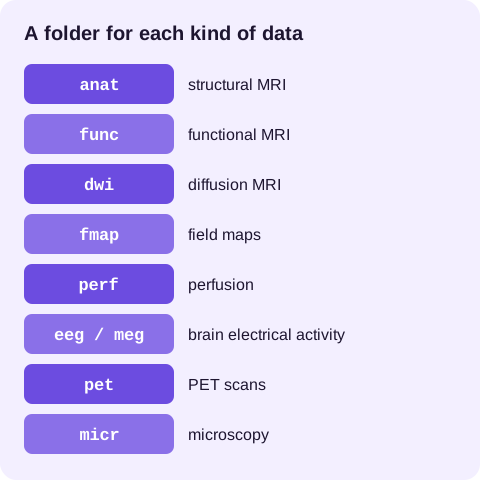
Inside, files are grouped by data type. anat holds structural scans and func holds functional MRI. dwi is for diffusion imaging, fmap for field maps and perf for perfusion. Other kinds of data get folders such as eeg, meg, pet and micr.
If participants were scanned more than once, a session level sits between the participant and the data type, for example sub-01/ses-baseline/anat/. Sessions are optional. A single-visit study can leave them out entirely.
The derivatives folder holds the results of processing, such as cleaned images or statistics. Keeping them apart means the originals are never mixed with results.
How file names work
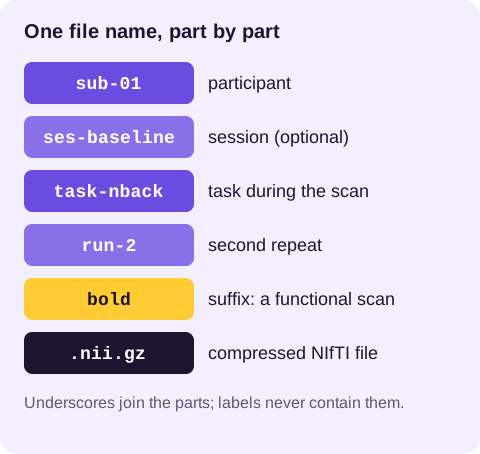
A BIDS file name is a chain of key-value pairs, called entities, joined by underscores. Then comes a suffix that says what the file is, and then the extension.
sub-01_ses-baseline_task-nback_run-2_bold.nii.gz
Reading it left to right: participant 01, session "baseline", the n-back task, the second run, a BOLD functional scan, stored as a compressed NIfTI file.
Which 7 entities appear most often?
| Entity | Meaning | Example |
|---|---|---|
sub |
Participant label | sub-01 |
ses |
Session label | ses-pre |
task |
Task performed during a functional scan | task-rest |
acq |
A variant of the acquisition, such as a different protocol | acq-highres |
run |
Repeat number of the same scan | run-1 |
dir |
Phase-encoding direction, often for field maps | dir-AP |
echo |
Echo number in a multi-echo scan | echo-2 |
Entities must appear in the order the specification lists. Labels use only letters and digits, so they cannot contain underscores or hyphens. That strictness is what lets software split a name back into its parts reliably. Typical suffixes include T1w and T2w for structural scans, bold for functional MRI, dwi for diffusion and events for task timing.
Sidecar JSON files: the scan details
Images alone do not say how they were acquired. BIDS stores those details in a JSON file with the same name as the image, called a sidecar. For a functional scan, the sidecar holds values such as the repetition time, the task name, the slice timing and the echo time:
{
  "TaskName": "rest",
  "RepetitionTime": 2.0,
  "EchoTime": 0.03,
  "SliceTiming": [0.0, 1.0, 0.5, 1.5]
}
Some fields are required for some data types and others are recommended. The specification lists which is which for each modality, and the validator reports missing required fields.
BIDS also has an inheritance rule. A sidecar placed higher in the folder tree applies to every matching file below it.
Say every participant did the same task with the same settings. Then 1 task-rest_bold.json at the top level can describe them all. Any differences go in that scan's own sidecar. Use this rule with care. It saves repetition, but a value at the wrong level quietly applies to scans it should not.
Which top-level files does a dataset need?
dataset_description.json is required. It names the dataset and records the BIDS version it follows. It can also list authors, the licence, funding, how to credit the data and an ethics approval number.
participants.tsv is a tab-separated table with one row per participant and columns such as age, sex, handedness or group. It is where demographic information belongs, rather than in folder names.
README describes the study in plain language: what was collected, how, and anything a future user should know. It is one of the most useful files in a shared dataset and one of the most often skipped.
CHANGES records versions of the dataset over time, which helps when a dataset is corrected after publication.
events.tsv files sit next to task scans. They list each stimulus or response with its start time, length and condition, so the analysis knows what happened during the scan.

Converting scanner data to BIDS
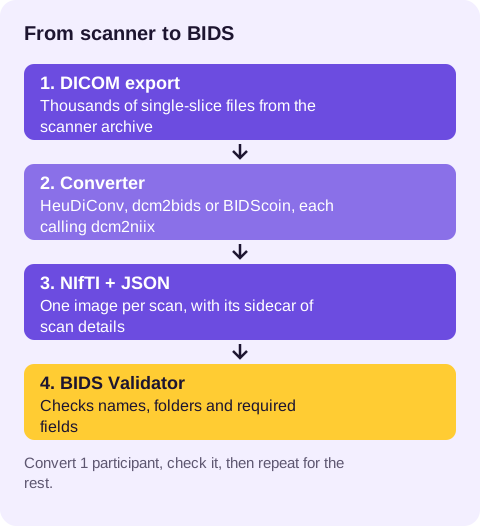
MRI scanners export DICOM files: thousands of single-slice images with detailed headers. BIDS uses NIfTI images instead, so conversion is the first step for most studies.
The core converter for most tools is dcm2niix. It turns DICOM series into NIfTI images and writes a JSON sidecar from the header. On its own it does not decide BIDS names or folders, so several tools wrap it:
- HeuDiConv uses a small Python heuristic file you write to map each scanner series to a BIDS name. It suits labs that run the same protocol many times.
- dcm2bids uses a JSON configuration file that matches series by their header fields.
- BIDScoin offers a graphical editor for building the mapping, which helps teams less comfortable with scripting.
Whatever tool you choose, convert one participant first, inspect the result and run the validator before converting the whole study. Keep the original DICOM files: a conversion can be repeated with corrected settings, but missing originals cannot be recovered.
Protocol names on the scanner make conversion much easier. If the radiographer names each sequence consistently, for example T1w_MPRAGE or func_task-rest, the mapping rules stay simple and errors are rare.
How do you validate a dataset?
The BIDS Validator checks a dataset against the specification. It runs in a web browser without uploading your data, or as a command-line tool for automated checks. It reports errors, which break the standard, and warnings, which point to missing recommended information or unusual choices.
Treat the validator as a structure check. Fix each error at its cause, such as a misnamed file or a missing field. Don't just rename files until the message goes away.
A dataset can pass validation and still contain a wrong value, such as an incorrect repetition time copied from the wrong protocol. Spot-check sidecar values against the scanner protocol for at least one participant.
Some files sit outside the standard on purpose, such as a lab's own notes. List them in a .bidsignore file and the validator skips them. Record the validator version and keep its output with the dataset.
Privacy before sharing
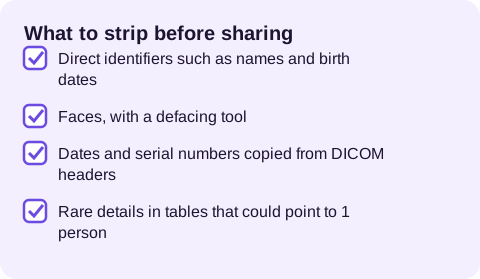
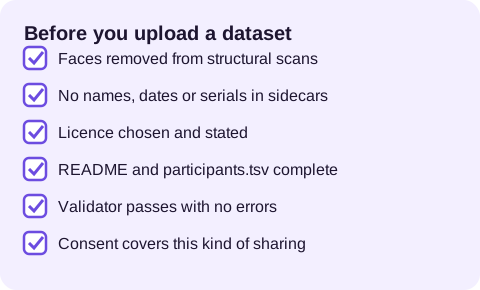
Neuroimaging data is personal data. Before a dataset leaves the lab, remove direct identifiers. Participant labels should not be names, initials, dates of birth or hospital numbers.
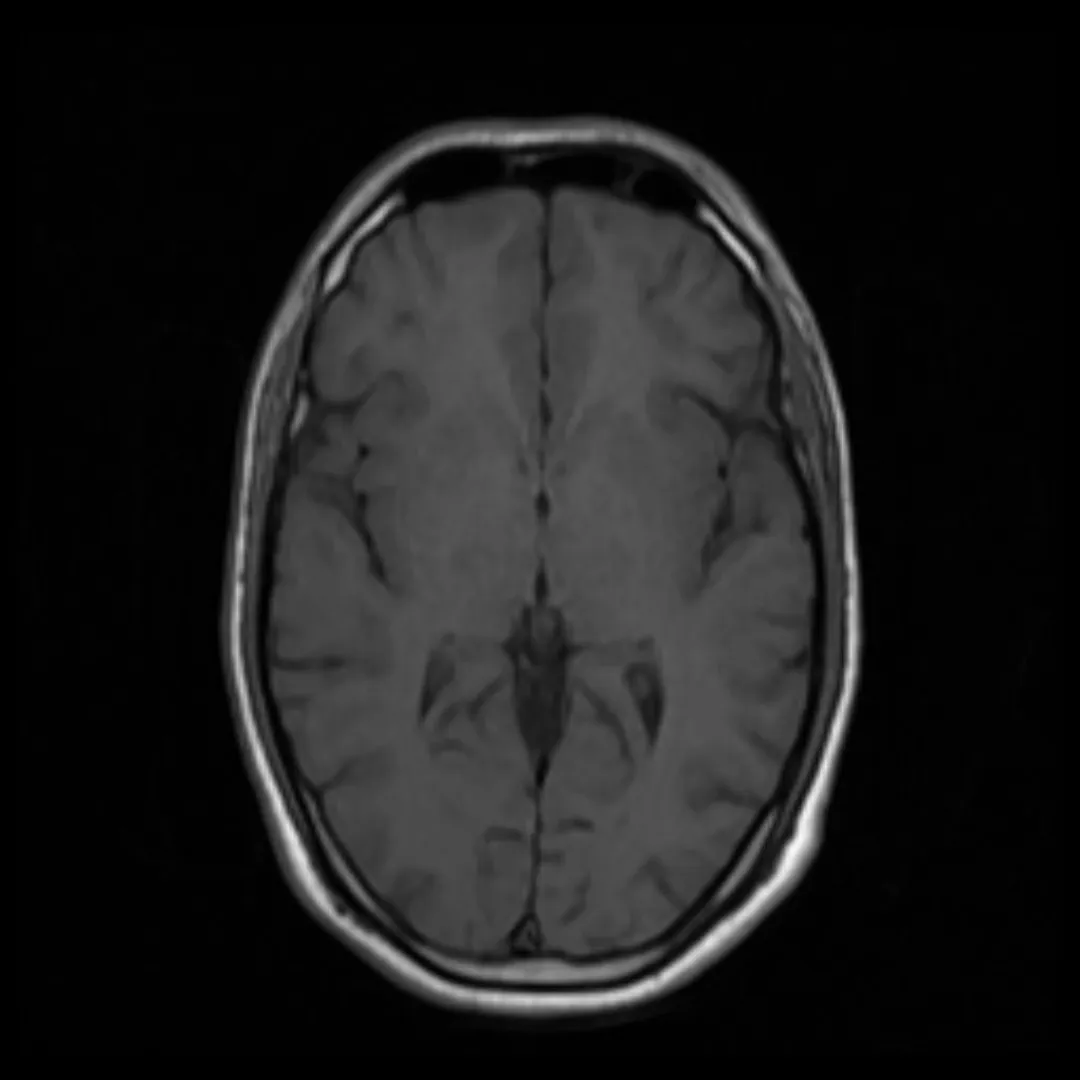
Structural MRI scans show the face. Shared datasets usually have faces removed with a defacing tool such as pydeface. Check the JSON sidecars and DICOM fields too. They must not carry names, dates or scanner serials your ethics approval won't let you share.
Follow the consent forms and ethics approval for the study. Some participants agree to open sharing. Others agree only to sharing with approved researchers. That choice belongs to the study's rules, not to the format.
Does BIDS work beyond MRI?
EEG, MEG and intracranial EEG. These datasets keep recordings in their usual formats, such as BrainVision, EDF or the maker's MEG format. BIDS files are added around them. A channels.tsv file lists every channel with its type and units. An electrodes.tsv file gives sensor positions. A coordsystem.json file says which coordinate system those positions use.
Events go in events.tsv, exactly as for functional MRI. MNE-BIDS, part of the MNE-Python project, can write these files from recordings already loaded in Python, which removes most of the manual work.
PET. Positron emission tomography datasets add details that MRI does not need, such as the radiotracer, injected dose and the timing of each frame. Blood sampling data, when collected, goes in its own tabular files beside the images so kinetic modelling software can find it.
Microscopy. The microscopy extension applies the same ideas to tissue samples. The folders describe the sample as well as the participant. Sidecars hold the microscope, magnification and pixel size.
The same habits apply to all of them. Use 1 folder per participant and names built from entities. Record every scan detail in a file next to the data.
How should you plan a study around BIDS?
BIDS is easiest when it is planned before the first scan rather than applied after the last one.
Agree on labels early. Decide participant labels, session names and task names at the protocol stage, and write them into the study's standard operating procedure. Short, stable labels such as ses-pre and ses-post save renaming later.
Name scanner protocols to match. Ask the imaging facility to name each sequence on the scanner so the converter can map it automatically. A consistent protocol name is worth more than any amount of renaming scripts.
Capture task logs in a usable form. Have the stimulus software export start times and lengths in seconds from the scan start. Then building events.tsv is a straight copy.
Convert as you go. Convert and check each participant soon after scanning. You catch problems, such as a missing field map or a misnamed run, while a rescan is still possible.
Write the README during the study. Notes about protocol changes, scanner upgrades or odd sessions are easy to write at the time. Years later they are nearly impossible to rebuild.
What does a worked example look like, from scanner to checked dataset?
- Export the participant's DICOM files from the scanner archive into a working folder, keeping the original export untouched.
- Run the converter with your mapping file. It calls dcm2niix, renames each series to BIDS and writes the sidecars.
- Open the sidecar for the functional scan and check the repetition time and task name against the protocol sheet.
- Copy the stimulus log into
sub-01_task-nback_run-1_events.tsvwith onset, duration and trial type columns. - Add the participant's row to
participants.tsv. - Run the validator on the dataset folder, then fix each error at its source.
- Run MRIQC on the participant and look at the report for motion or artefacts.
When that participant is clean, the same mapping and checklist apply to everyone else in the study.
What happens next
Need software for the images themselves? Our research imaging page lists the main free tools and standards in one place.
Find more research tools
Which software reads BIDS?
Once a dataset is in BIDS, a large set of tools can read it without configuration.
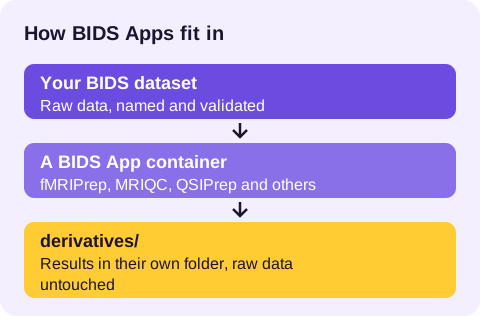
BIDS Apps are containerised pipelines that take a BIDS dataset as input and write derivatives. They run the same way on a laptop or a computing cluster. Well-known examples include:
- fMRIPrep, a widely used preprocessing pipeline for functional MRI that produces a report on each participant.
- MRIQC, which computes image-quality measures so poor scans can be spotted before analysis.
- QSIPrep, which preprocesses diffusion MRI.
PyBIDS is a Python library for searching a BIDS dataset. You can ask for "every BOLD run for task rest in session 2". That keeps your own scripts shorter and safer.
Many analysis packages, including tools in the MNE-Python ecosystem for EEG and MEG, can read and write BIDS directly.
Where do processed results go?
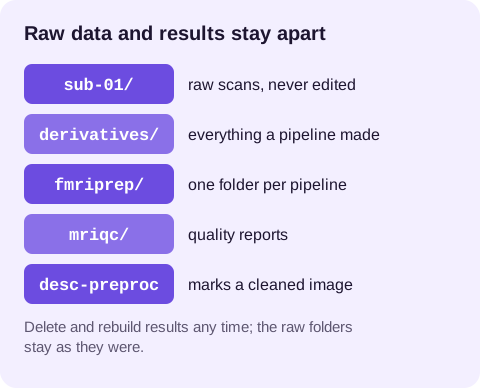
Processed outputs belong in the derivatives folder, usually one subfolder per pipeline, such as derivatives/fmriprep/. Each derivatives folder has its own dataset_description.json naming the pipeline and its version. Derivative files follow BIDS-style names with extra entities, such as space-MNI152NLin2009cAsym to record the template the image was aligned to, or desc-preproc for a description.
Keep raw data and derivatives apart. Then you can delete and rebuild results whenever a pipeline improves, and the raw data stays untouched.
How do you share a BIDS dataset?
OpenNeuro is a free public archive for neuroimaging datasets that accepts BIDS datasets and validates them on upload. Each dataset gets a persistent identifier and version history, so a paper can cite exactly the data it used. Other archives and institutional repositories also accept BIDS, and some funders and journals now ask for data in a standard format.
Before uploading, check the licence you want to apply, the README, the participants file and the defacing. Once a dataset is public and downloaded, it cannot be recalled.
What are the common mistakes, and how do you avoid them?
- Inventing labels with punctuation.
sub-01_Abreaks the name, because an underscore inside a label is read as the start of a new entity. Usesub-01Aor a separate entity. - Putting demographics in file names. Age or group belongs in
participants.tsv, not insub-patient01. - Losing task timing. A task scan without an
events.tsvfile is far less useful. Export stimulus logs at the time of scanning. - Mixing derivatives with raw data. Write pipeline outputs to
derivatives/, never back into the participant folders. - Converting everything before checking one participant. One validated participant reveals mapping errors that would otherwise repeat across the whole study.
- Skipping the README. A future user, including you in 3 years, will need it.
How does the standard grow?
BIDS develops in public. New data types and features arrive through BIDS Extension Proposals, known as BEPs. Working groups of researchers draft them. The community reviews them before they join the specification.
The specification itself is maintained on GitHub, where anyone can read discussions, report a problem or propose a change. A steering group oversees the process.
The standard changes over time. Record the BIDS version your dataset follows in dataset_description.json. Check the current specification when you start a new study, rather than copying an old example.
How does BIDS fit the FAIR data principles?
Research funders, including those in Australia, increasingly expect data to be FAIR: findable, accessible, interoperable and reusable. The Australian Research Data Commons promotes these principles nationally. BIDS covers much of the interoperable and reusable parts by giving data a predictable structure and machine-readable metadata.
Findable and accessible depend on where the data is stored and listed. So pair a BIDS dataset with a repository record, a lasting identifier and a clear licence. A data management plan that names BIDS as the format, and a repository as the destination, answers most of what a funder asks.
How do you keep a BIDS dataset tidy over time?
A dataset is rarely finished on the day of the last scan. Participants withdraw, a sidecar value turns out to be wrong, or a new derivative is added. Version control helps. Many labs manage BIDS datasets with DataLad. It builds on git and git-annex to track large files and record every change.
Even without it, add a dated line to the CHANGES file for each fix. Rerun the validator after every change. Keep earlier versions of shared datasets, so published results can still be checked.

What do the main BIDS terms mean?
Entity. A key-value pair in a file name, such as sub-01 or run-2.
Suffix. The last part of a file name before the extension, saying what the file contains, such as T1w or bold.
Sidecar. A JSON file with the same name as a data file, holding its acquisition details.
Modality. A broad kind of data, such as MRI, EEG or PET, each with its own section of the specification.
Data type. The folder a file sits in within a participant or session, such as anat, func or eeg.
Inheritance. The rule that a metadata file higher in the tree applies to matching files below it.
Derivatives. Outputs of processing, stored separately from raw data with their own description file.
BIDS App. A containerised pipeline that takes a BIDS dataset as input and writes derivatives.
BEP. A BIDS Extension Proposal, the route by which new data types and features join the standard.
Where to start
If you are new to BIDS, the project's getting-started pages collect tutorials, example datasets and explanations aimed at beginners. Download a small example dataset, open the folders and compare each file against the specification page for its data type.
Then convert one of your own participants, validate it and fix what the validator reports. After the first study, the same mapping files and checklist make the next one far quicker to organise.
For local image-analysis software, see the scientific image analysis guide. For other research resources, return to scientific imaging.
This page keeps an older research address alive with a current guide. Imaging Tools does not host the original ACCS or OHBM event or speak for those groups. The BIDS project and its specification remain the authority. No participant dataset is uploaded to this website. The resource links explain where to start. They do not replace the access, ethics or data-management arrangements for your project.
What happens next
Want to know where this guide's facts come from? Our method page explains how we check sources and what we never claim.
How we write these guides